
Coach question · updated 16 October 2026
How do I give video feedback on my athletes’ lifts remotely?
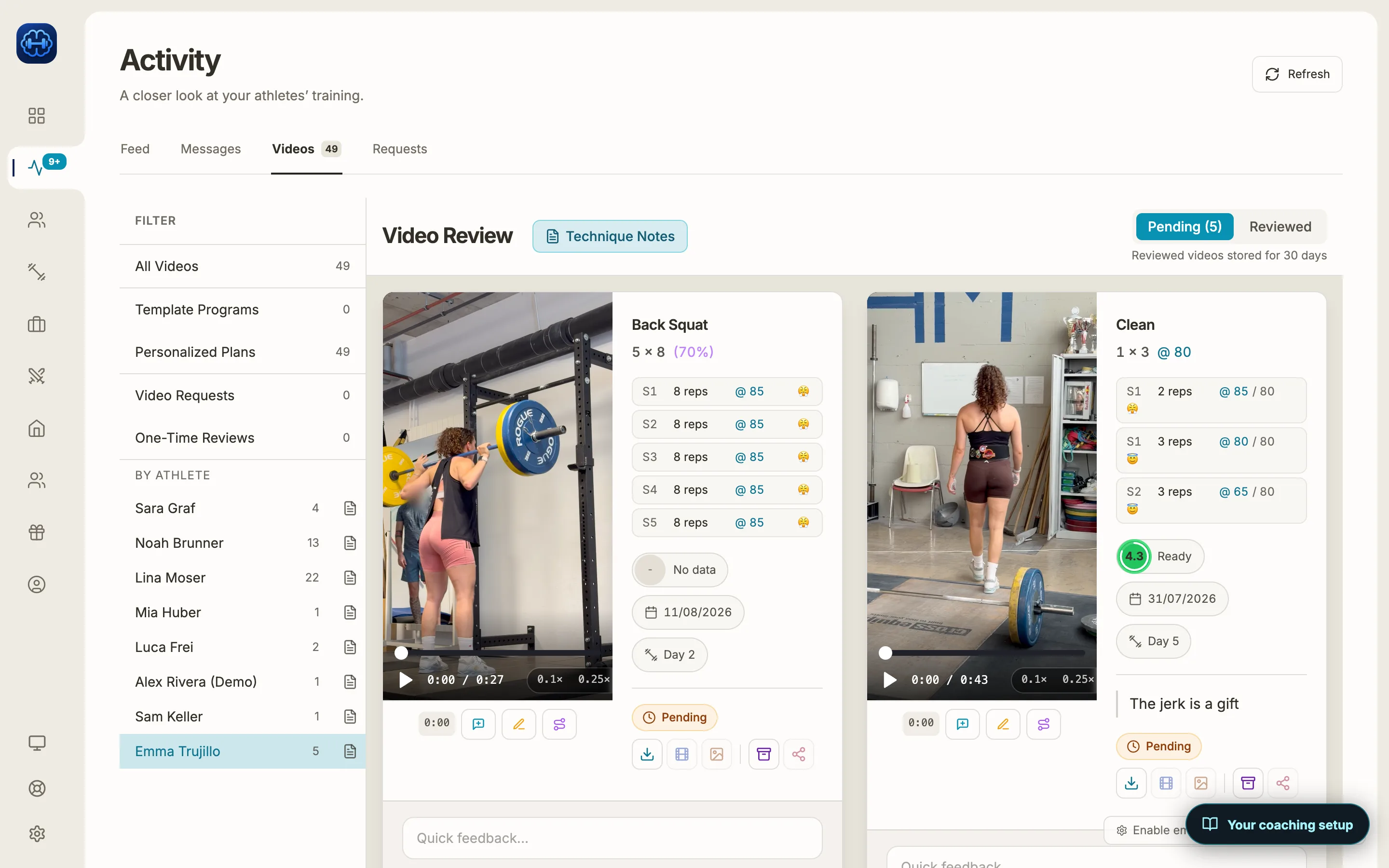
Have athletes send the clip inside their training app, attached to the exercise they just lifted, so the video arrives with the sets they logged. In Strength Academy it lands in your Videos queue with a push. You watch it at 0.1×, 0.25× or 0.5×, add notes at the exact moment, draw lines, circles and angles on a paused frame, and reply by text, voice or a recorded breakdown. The athlete gets a push and sees your feedback next to their clip.
How it works
The athlete sends the lift
After a set, the athlete picks a clip from their phone and attaches it to that exercise. Clips can be up to 45 seconds and 250 MB, and a longer clip can be trimmed in the app. You switch video feedback on for each program.
It lands in your queue
You get a push, and the clip waits under Activity, Videos with the athlete’s logged sets, the date and the training day beside it. Filter by athlete or by program, and see what is pending and what you have reviewed.
Slow it down and mark the moment
Play the lift at 0.1×, 0.25×, 0.5× or full speed. On a computer the arrow keys step frame by frame. Add a note at any timestamp in text, voice or video, or pause and mark the frame with line, circle and angle tools in six colours.
Reply the way you coach in the gym
Record a voice reply of up to 2 minutes, or a breakdown of up to 3 minutes 30 seconds where you talk and draw over the clip as it plays. Sending marks the video reviewed, and the athlete gets a push and finds your feedback on their Video Review page.
Other ways coaches do this
Without a coaching app, form checks usually arrive over WhatsApp or Instagram, away from the program and the sets the athlete logged.
On Trainerize’s ideas board, a request to attach videos and photos to exercise comments for form checks has had more than 100 votes since August 2019 and shows no status as of October 2026.
Limits worth knowing
- Clips can be up to 45 seconds and 250 MB, one per exercise per training day. Athletes choose a clip from their phone; there is no camera inside the upload yet.
- Reviewed videos are kept for 30 days. Clips the athlete keeps in their Evolution library stay, and that is also where before and after comparisons live.
- Bar path tracing is for the snatch and the clean & jerk, started by you. It does not trace squats, bench or deadlifts yet.
- Frame-by-frame stepping uses the arrow keys on a computer.
Common questions
Checked against the app on 16 October 2026. Spotted something outdated? Email info@strengthacademy.app.
Go deeper
Other coach questions
- Track rep maxes and weekly volume
- Percentage-based programming app
- Volume and intensity while you program
- Turn one week into a progressive block
- Move a Google Sheets program into an app
- Keep what your clients pay you
- Use Claude or ChatGPT with your coaching app
- Build training programs on your phone
- Chat, check-ins and programs in one app
Try it with your own program
The 14-day trial includes every feature, so you can build a real week, send it to an athlete and see what they log.
Prefer to set it up together? Book a free 15-minute intro call