
Coach question · updated 16 October 2026
How do I turn one training week into a progressive block?
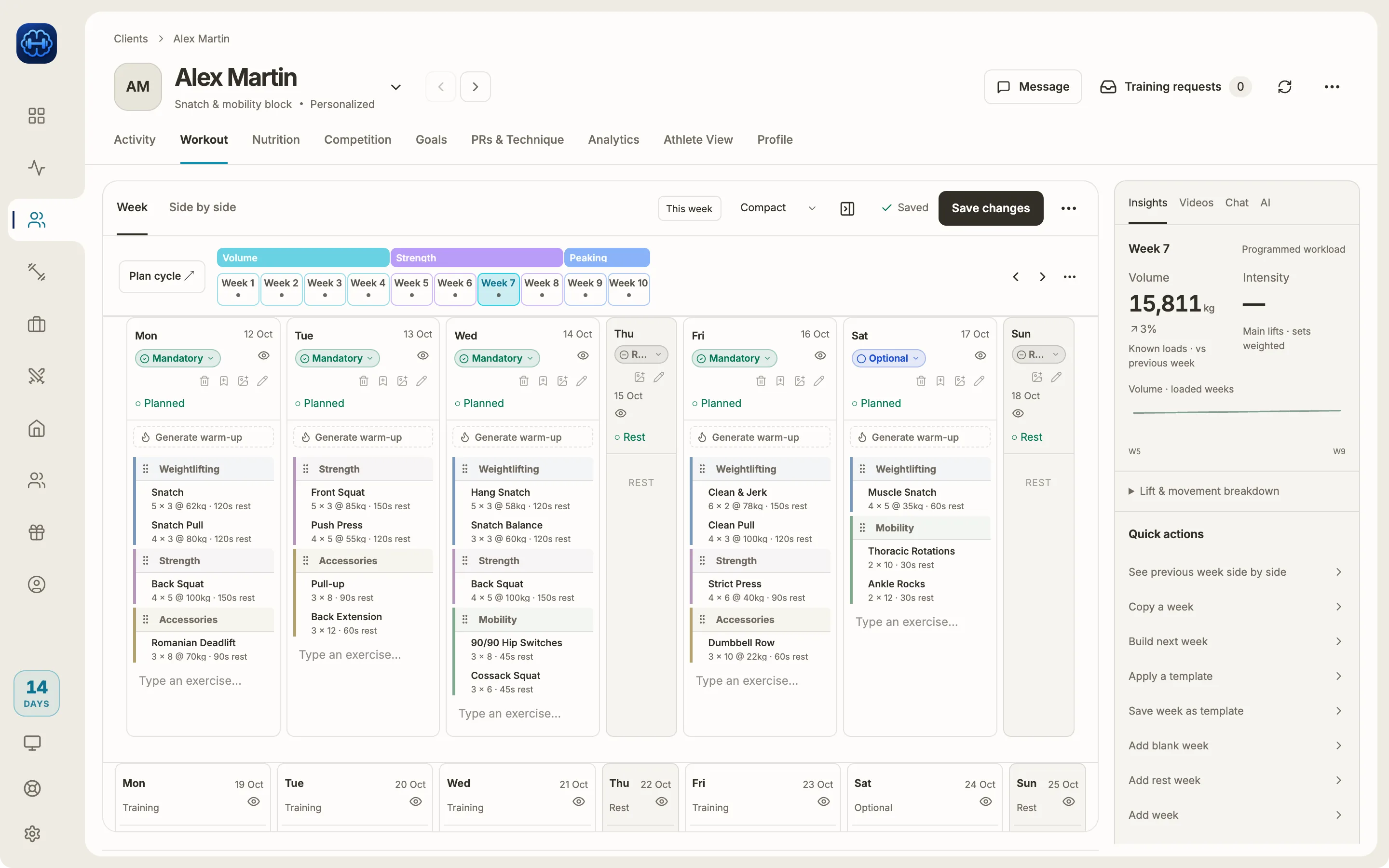
Write one good week, then copy it forward with a progression rule for each new week. In Strength Academy’s week builder, “Copy a week” creates up to 12 weeks at once, and a duplication scenario sets how each one changes: sets up or down, intensity up or down by a percentage, and RPE. Presets cover a 3-week accumulation, 4 weeks with a deload, peaking and a deload week, and each athlete’s kilos are worked out from their own maxes.
How it works
Start from your best week
In the week builder, open Quick actions and pick “Copy a week” or “Duplication scenarios”. Choose how many weeks to create, from 1 to 12. On a fixed-length template the copies fill the weeks that are left.
Give each new week its rule
A rule changes sets by a number or a percentage (never below one set), intensity by a percentage and RPE in whole steps from 1 to 10. Apply it to every session, one session type or one lift group.
Or start from a preset
3-Week Accumulation keeps the first copy as it is, then adds a set and 2.5% intensity, then two sets, 5% and one RPE. There are also 4-Week Accumulation + Deload, Peaking (fewer sets, heavier), a Deload week and Maintenance, a straight copy. Tune any number before you save.
Check it, then edit any week
The preview marks what went up in green and what went down in red. Each copy is still a normal week you can edit by hand, and athletes see their new kilos worked out from their own maxes.
How coaches usually do it
In a spreadsheet, a block means copying the week and changing each percentage and set count by hand, then checking nothing was missed.
On Trainerize’s ideas board, a request for an automatic intensity increase was posted in May 2020 and shows no status as of October 2026.
Limits worth knowing
- A rule changes sets, intensity and RPE. Reps stay as written; change them by hand.
- Rules do not stack. Each new week is the source week plus its own rule, so week three of an accumulation adds two sets to the source week, not to week two.
- Loads in kilograms are multiplied by the intensity change and rounded up to a whole kilogram. Percentage loads move by percentage points.
- Up to 12 weeks per copy. Deloads and peaks come from the presets or your own rules; the app does not add them on its own.
- Weightlifting and Strength sessions are the ones selected to start with.
- Strength loads are in kilograms. Pounds are only available in the CrossFit workout builder for now.
Common questions
Checked against the app on 16 October 2026. Spotted something outdated? Email info@strengthacademy.app.
Go deeper
Other coach questions
- Track rep maxes and weekly volume
- Percentage-based programming app
- Volume and intensity while you program
- Give video feedback on lifts remotely
- Move a Google Sheets program into an app
- Keep what your clients pay you
- Use Claude or ChatGPT with your coaching app
- Build training programs on your phone
- Chat, check-ins and programs in one app
Try it with your own program
The 14-day trial includes every feature, so you can build a real week, send it to an athlete and see what they log.
Prefer to set it up together? Book a free 15-minute intro call