
Coach question · updated 15 October 2026
Is there a coaching app that tracks rep maxes and shows volume week by week?
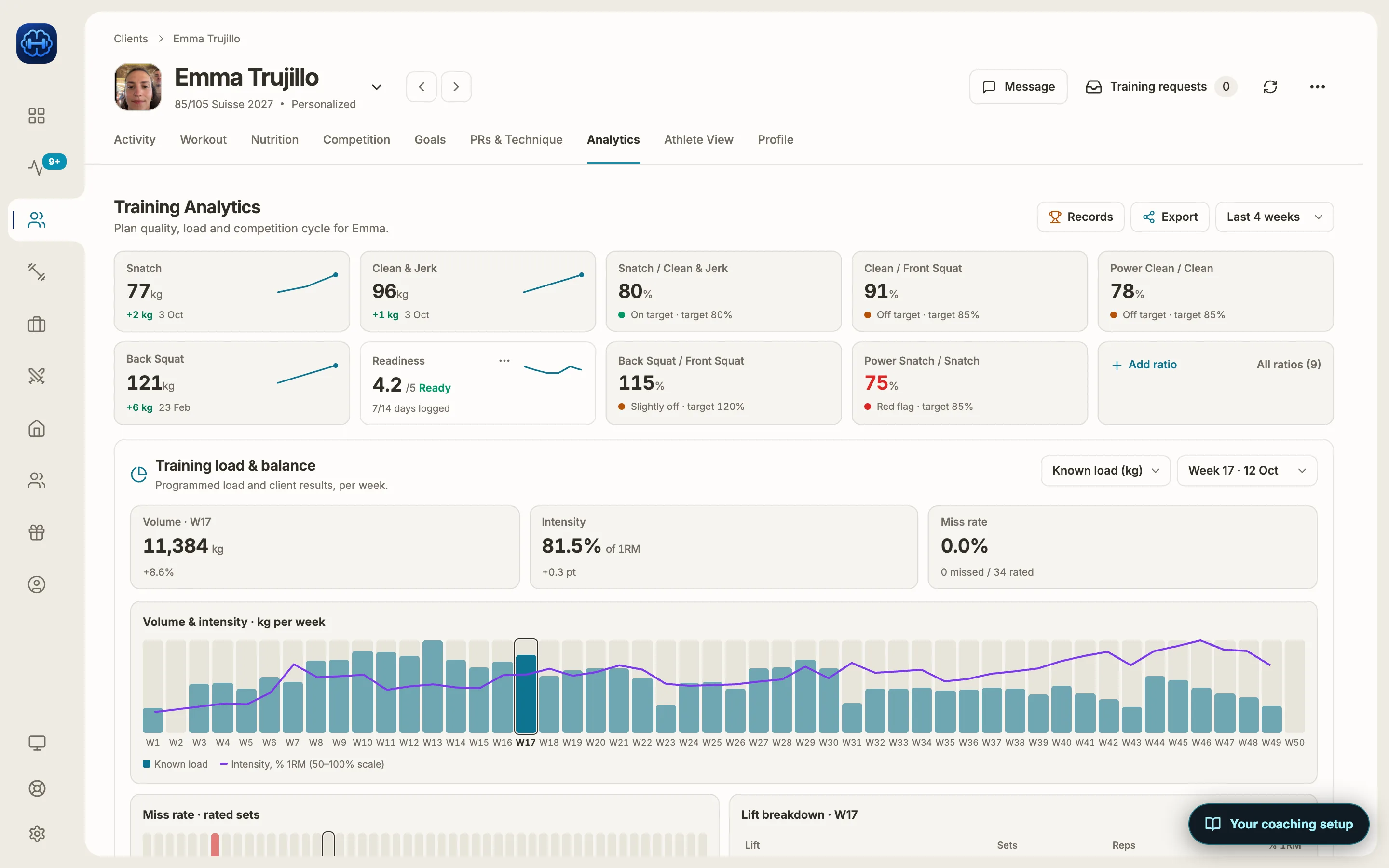
Yes. Strength Academy keeps each athlete’s 1, 2, 3 and 5-rep maxes for any lift, and updates them on its own when the athlete logs a heavier set. As the coach, you see each main lift’s max with its trend on the athlete’s Analytics tab, and a chart of training volume in kilograms for every week of the plan, with average intensity as a percentage of 1RM on top.
How it works
Maxes by lift and rep count
Each athlete has 1, 2, 3 and 5-rep maxes for any lift. Athletes can enter and correct their own, and you can add or correct a client’s 1RMs yourself. For weightlifters and powerlifters, the main lifts show as tiles with a trend line, the date of the last record and how much it went up.
Updated when they lift more
When an athlete logs a heavier single, double, triple or set of five in training, that rep max updates on its own and you get a PR card in your activity feed. Missed lifts never move it. The athlete’s monthly recap also shows an estimated 1RM trend for a main lift, worked out from their best sets.
Volume for every week of the plan
For weightlifting and powerlifting clients, the Analytics tab charts volume in kilograms per week across the whole plan, with average intensity as a line on top, the change from the week before, the miss rate and a breakdown by lift for any week you pick. Other sports have their own weekly charts: CrossFit shows planned against completed reps, running and HYROX show planned against actual kilometres, and every other sport shows weekly volume and sessions.
Each max across the season
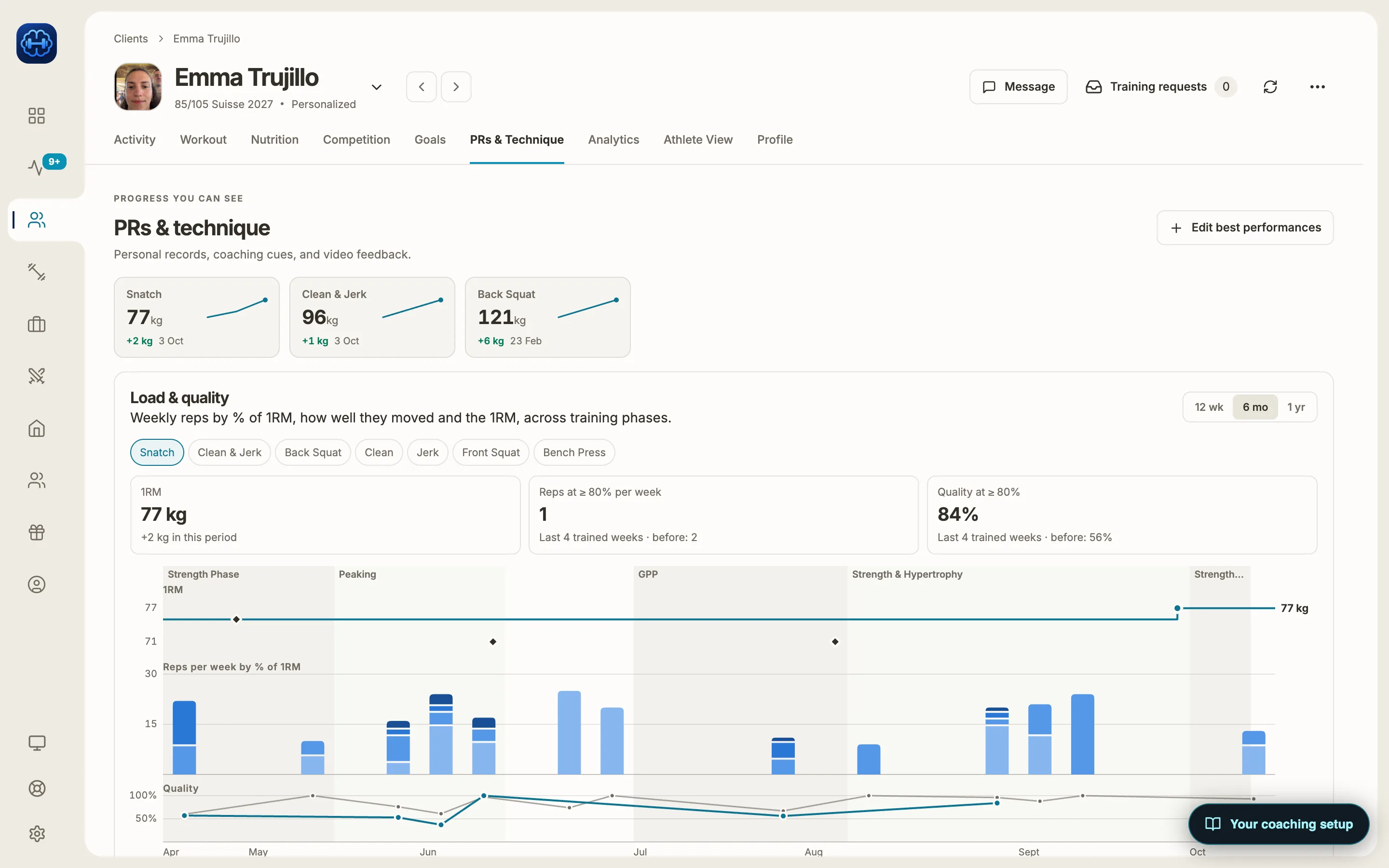
For each main lift, the PRs & Technique tab plots the 1RM across your training phases, next to the reps done each week at different percentages of 1RM, over 12 weeks, 6 months or a year. While you program, the “Link to 1RM” picker charts the lift’s 1, 2, 3 and 5-rep maxes over time.
The max next to the work that built it
Pick a lift and see its 1RM through each training phase, the weekly reps by percentage of 1RM, and how well the athlete moved at 80% and above.
Other apps that do this
TrainHeroic, TeamBuildr and BridgeAthletic also track maxes and have strong reporting. TeamBuildr and BridgeAthletic are built mostly for teams and schools. General personal training apps such as Trainerize and TrueCoach mostly show exercise history and personal bests.
What Strength Academy adds is the same volume and intensity while you write the week, before the athlete trains it.
Limits worth knowing
- Strength loads are in kilograms. Pounds are only available in the CrossFit workout builder for now.
- Maxes are kept at 1, 2, 3 and 5 reps. There is no 4RM, 8RM or 10RM.
- Max tiles and 1RM history are on the weightlifting and powerlifting Analytics tabs. The history fills in on its own for the snatch, clean, jerk and clean & jerk; for other lifts the current max always updates but the history shows fewer points.
- Athletes see their own records, a 28-day training load chart and a weekly recap against the week before. The week-by-week volume chart is in the coach view.
- The weekly intensity line uses the main lifts: snatch, clean, jerk, squats and pulls. Powerlifters’ squat, bench and deadlift have their own volume and intensity charts on the powerlifting Analytics tab.
Common questions
Checked against the app on 15 October 2026. Spotted something outdated? Email info@strengthacademy.app.
Go deeper
Other coach questions
- Percentage-based programming app
- Volume and intensity while you program
- Give video feedback on lifts remotely
- Turn one week into a progressive block
- Move a Google Sheets program into an app
- Keep what your clients pay you
- Use Claude or ChatGPT with your coaching app
- Build training programs on your phone
- Chat, check-ins and programs in one app
Try it with your own program
The 14-day trial includes every feature, so you can build a real week, send it to an athlete and see what they log.
Prefer to set it up together? Book a free 15-minute intro call