
Coach question · updated 25 November 2026
Is there a coaching app where I can see several weeks of a block side by side?
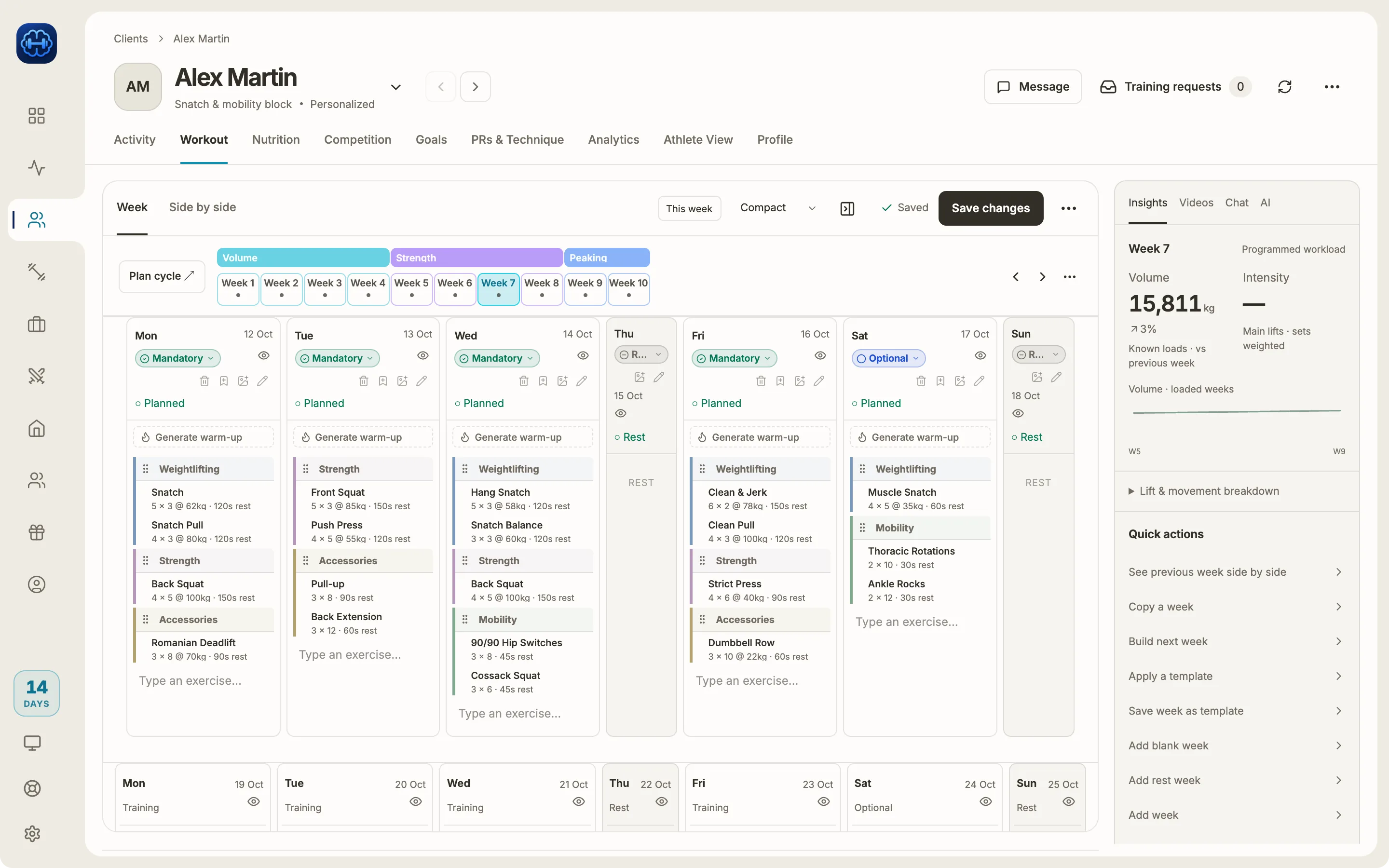
Yes. Strength Academy’s week builder has a Side by side view that shows three weeks of a client’s plan next to each other: one you edit and the two around it to compare. Above the days, a timeline shows the block’s phases and weeks, and the Insights panel gives the week’s volume in kilograms and the intensity of the main lifts, compared with the previous week. It works on desktop and tablet.
How it works
Switch to Side by side
The Side by side tab shows three weeks next to each other. Pick the week to edit; the two around it stay visible to compare, and the arrows move through the block.
Read the block on the timeline
Above the days, a timeline shows the block’s phases in colour over week 1 to the last week. Click a week to jump to it.
Check the week’s numbers
The Insights panel shows the week’s volume in kilograms and the intensity of the main lifts, each against the previous week, a small chart of volume across the loaded weeks, and the balance of movements or muscles in sets.
Plan the phases
Plan cycle opens the training cycle planner, where you set the blocks of the season, such as volume, strength, peaking and taper, with their goals and their volume and intensity.
Where the numbers come from
Volume adds the kilos of every set with a known load. Sets written as a percentage count when the athlete’s max for that lift is known, and sets without a known load add nothing rather than a guess.
Limits worth knowing
- Side by side, the timeline and the cycle planner are on desktop and tablet, not on a phone.
- Three weeks show at a time, and one of them is editable.
- Insights compares a week with the previous week only. While you type in a day, the panel switches to the block library; it comes back when you leave the day.
- Program templates show main-lift reps or working sets instead of kilograms, and the cycle planner is for client plans.
Common questions
Checked against the app on 25 November 2026. Spotted something outdated? Email info@strengthacademy.app.
Go deeper
Other coach questions
- Track rep maxes and weekly volume
- Percentage-based programming app
- Volume and intensity while you program
- Give video feedback on lifts remotely
- Turn one week into a progressive block
- Move a Google Sheets program into an app
- Keep what your clients pay you
- Use Claude or ChatGPT with your coaching app
- Build training programs on your phone
- Chat, check-ins and programs in one app
- EMOM, AMRAP and For Time with a client timer
- Booking, payments and programming in one app
- Copy and paste training between days and weeks
- Send a free guide when someone comments a keyword
- A Trainerize alternative for percentage-based programs
Try it with your own program
The 14-day trial includes every feature, so you can build a real week, send it to an athlete and see what they log.
Prefer to set it up together? Book a free 15-minute intro call